How to add your card to ChatGPT and subscribe
ChatGPT plans are bought on the website. Your card number, expiry date, CVC and billing address are all in the card email — follow the steps below.
Steps
- 1
Open the plans page
In a browser, open chatgpt.com/pricing (do not upgrade from the iPhone app). Pick Plus — or Go or Pro — and click "Get Plus". Prices show in your local currency; the screenshot was opened in Canada, so it shows CAD.
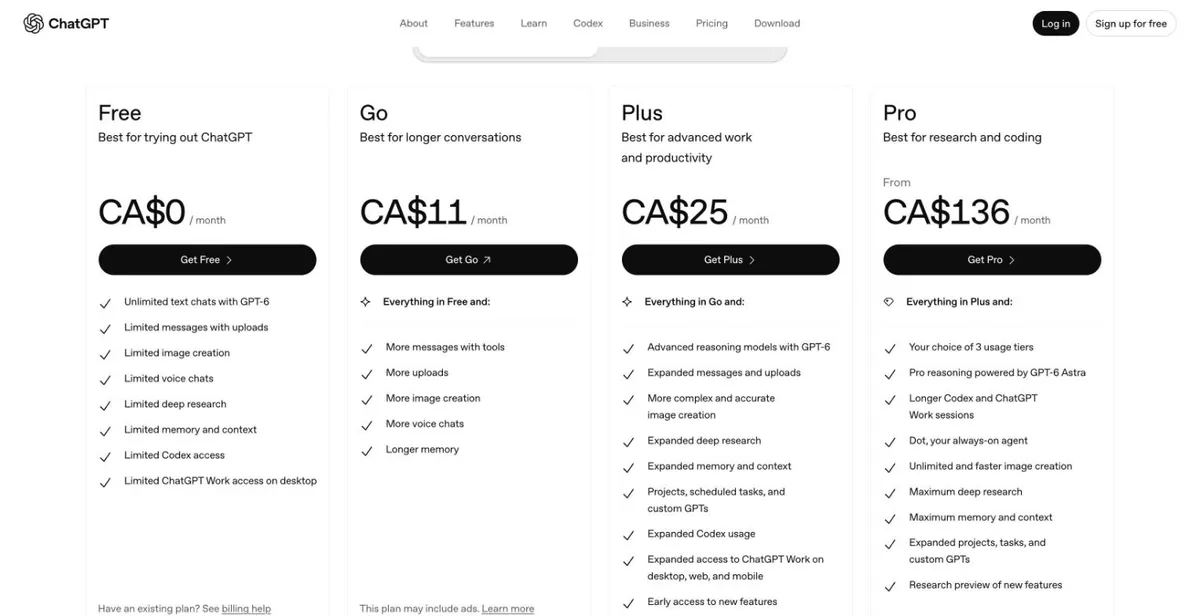
chatgpt.com/pricing (signed out) - 2
Sign in
Sign in to your ChatGPT account (create one first if needed). You land on the payment page.
Screenshot coming — follow the text above for now. - 3
Enter the card
Choose Card and enter the card number, expiry date (MM/YY) and CVC from your card email.
Screenshot coming — follow the text above for now. - 4
Enter the billing address
Use the billing address from your card email. The country and postcode must match it.
Screenshot coming — follow the text above for now. - 5
Confirm
Click subscribe and wait for the success message. Changing the card or cancelling later is done in the subscription section of ChatGPT settings.
Screenshot coming — follow the text above for now.
Common reasons it fails
Why ChatGPT charges on our cards failed over the last 60 days (share of failed charges):
- About 80%: not enough balance. The card held less than the charge. Some regions add tax, so the charge can be above the list price — keep a few dollars extra.
- About 20%: the card was already cancelled (shows as Blocked in your transactions) but ChatGPT kept charging the old card. Switch to your current card in ChatGPT’s subscription settings.
- Under 1%: wrong expiry date. Enter month/year exactly as in the card email.
Check the balance and transactions, or top up this card: Card lookup & top-up
Payment declined? Read: ChatGPT Plus payment declined
Renewal failed? Read: ChatGPT Plus renewal failed
Still stuck? Contact support
Tell us which step failed and what the page said — a screenshot helps.