🧑💻
Can you pay GitHub Copilot with this card? Check GitHub’s rule first
Short answer: GitHub’s payment docs say "Prepaid credit/debit cards are not accepted". Pink Card is a prepaid card and our cards have no successful GitHub charge yet, so we don’t recommend using it for Copilot — a declined charge still costs the $1 fee.
We don’t recommend paying GitHub Copilot with Pink Card. The steps below only show where the plans and payment settings are, for use with your own bank card or PayPal.
Steps
- 1
Check the plans
Open github.com/features/copilot/plans to see Free, Pro, Pro+ and other plans.
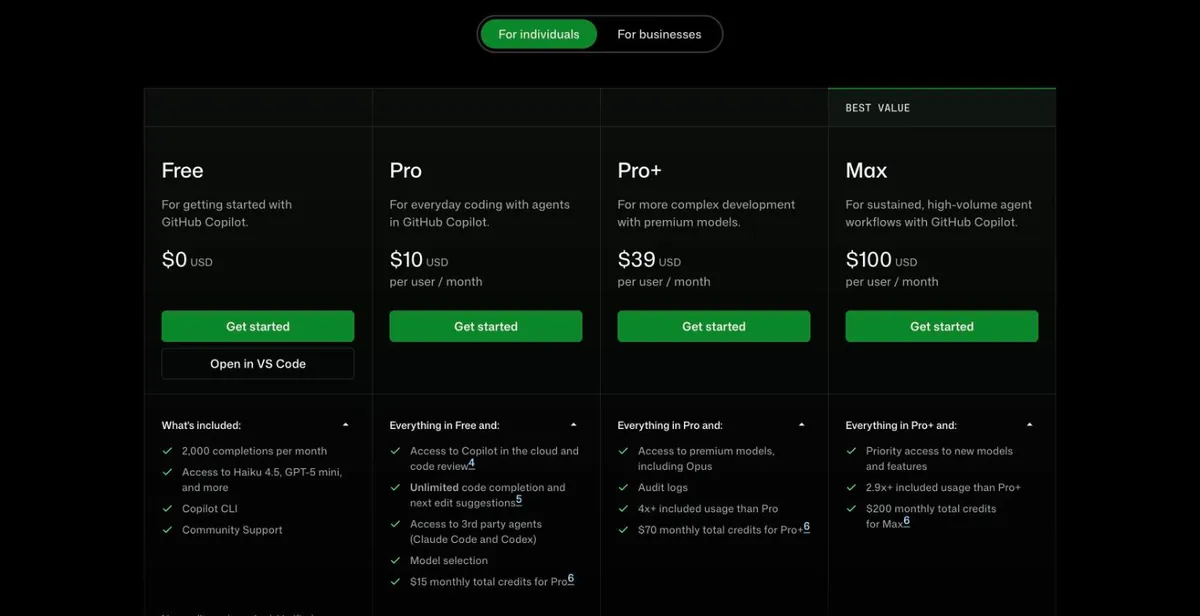
GitHub Copilot plans (signed out) - 2
Where payment info goes
Signed in to GitHub: avatar (top right) → Settings → Billing and licensing → Payment information. GitHub accepts bank-issued credit/debit cards and PayPal there.
Screenshot coming — follow the text above for now.
Common reasons it fails
What our cards show:
- Since our records began there has been one GitHub charge, still pending, and no successful one.
If a charge fails, top up first and then retry once — don’t keep clicking. Every charge costs $1, failed ones too (at most 3 failed-charge fees per card per month). Top-ups usually arrive within 5–10 minutes and the card number stays the same.
Check the balance and transactions, or top up this card: Card lookup & top-up
Switching to Cursor? Steps: How to add your card to Cursor
Still stuck? Contact support
Tell us which step failed and what the page said — a screenshot helps.