How to add your card to Grok and subscribe
Grok plans are bought on grok.com. Card number, expiry, CVC and billing address are in your card email.
Steps
- 1
Check the plans
Open grok.com/supergrok in a browser. The screenshot shows Plus / Premium / Super / Ultra in CAD (opened in Canada); plan names and prices are whatever the page shows you.
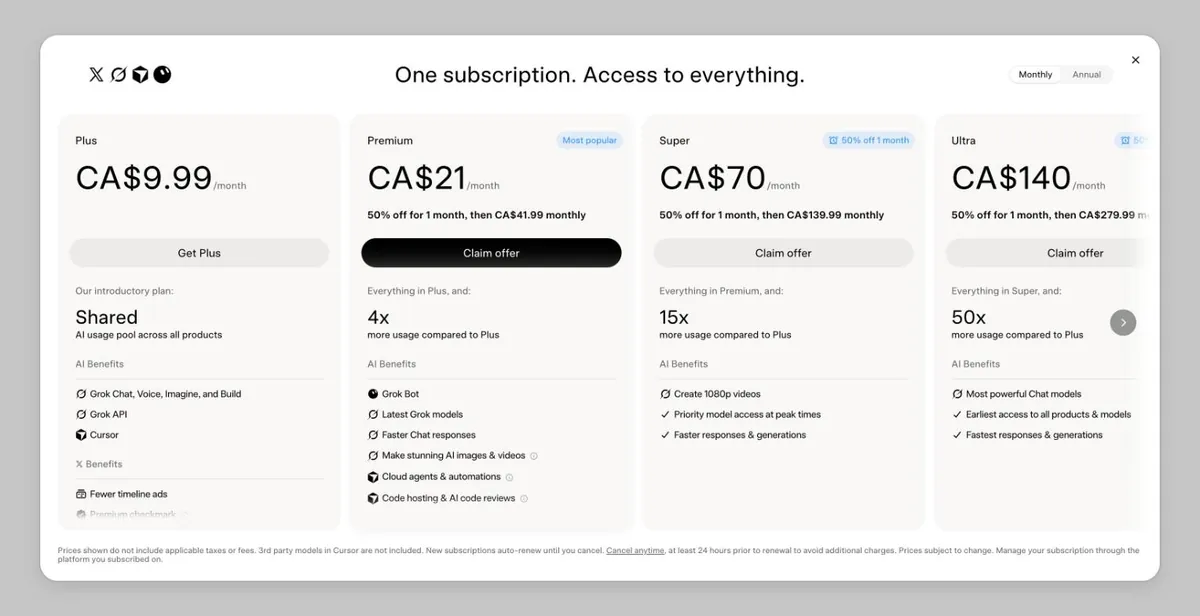
grok.com plans (signed out) - 2
Sign in
Sign in to grok.com — an X account works.
Screenshot coming — follow the text above for now. - 3
Pick a plan and enter the card
On the payment page enter the card number, expiry, CVC and billing address from your card email, then confirm.
Screenshot coming — follow the text above for now. - 4
Check it worked
Your subscription shows in your grok.com account settings, where you can also change the card or cancel.
Screenshot coming — follow the text above for now.
Common reasons it fails
Why Grok / xAI charges on our cards failed over the last 60 days (share of failed charges):
- About 86%: not enough balance — mostly the full-price second month after a half-price first month.
- About 12%: the card was already cancelled (Blocked) and the old card kept being charged. Switch cards in your grok.com account settings.
- About 2%: wrong expiry date.
Check the balance and transactions, or top up this card: Card lookup & top-up
Renewal failed? Read: Grok renewal failed
Still stuck? Contact support
Tell us which step failed and what the page said — a screenshot helps.