How to add your card to Midjourney and subscribe
Midjourney is bought on midjourney.com and has no regular free trial. Plans are Basic, Standard, Pro and Mega; yearly billing is about 20% cheaper. Card number, expiry, CVC and billing address are in your card email.
Steps
- 1
Check the plans
Midjourney’s help center compares the four plans with monthly and yearly prices — prices as shown on the official site.
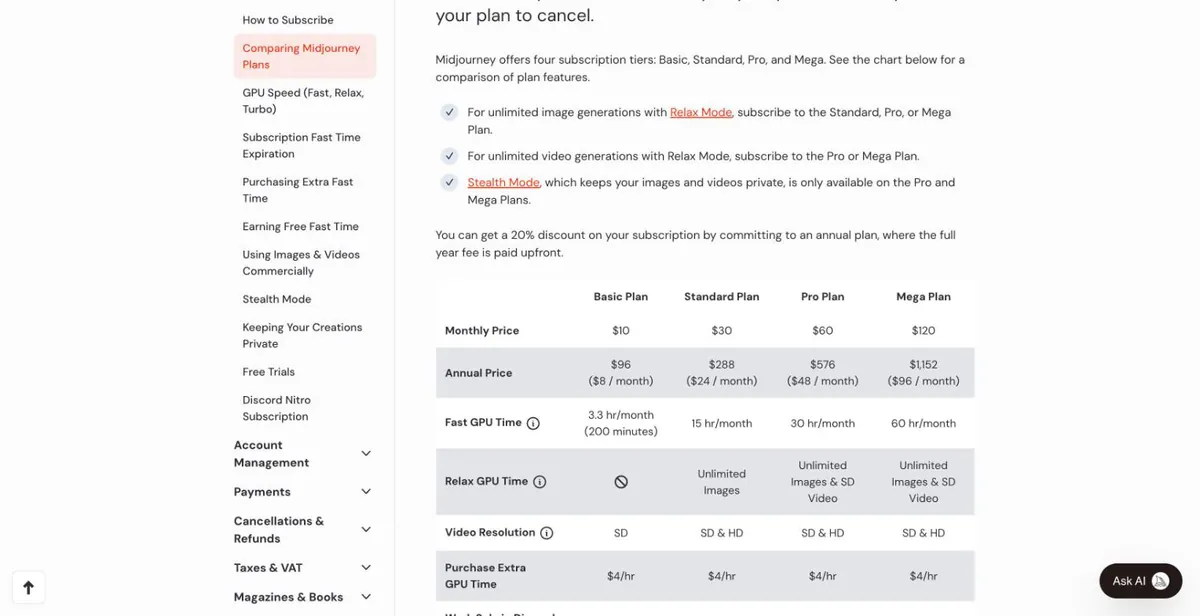
Midjourney help center plan comparison (signed out) - 2
Sign in and open the subscription page
Sign in at midjourney.com and open the subscription page from the left menu (Manage Subscription / Purchase Plans). Pick monthly or yearly and a plan.
Screenshot coming — follow the text above for now. - 3
Enter the card
On checkout enter the card number, expiry, CVC and billing address from your card email, then confirm.
Screenshot coming — follow the text above for now. - 4
Managing it later
Upgrades, downgrades, cancelling and changing the card are all on the same subscription page.
Screenshot coming — follow the text above for now.
Common reasons it fails
What our cards show:
- Midjourney charges on our cards are few, all successful so far, with no failed sample yet. If declined, first check the balance (tax may be added), then the billing address, and submit only once.
Check the balance and transactions, or top up this card: Card lookup & top-up
Still stuck? Contact support
Tell us which step failed and what the page said — a screenshot helps.