Short answer: if ChatGPT charged your card twice within a few days, it is usually not an OpenAI billing error. Most of the time there really are two purchases: a subscription on chatgpt.com plus another one in the iPhone (App Store) or Android (Google Play) app, two ChatGPT accounts paying with the same card, an upgrade charged mid-cycle, or ChatGPT credits bought on top of your plan.
Look at the merchant name and amount of both charges first. Two OPENAI *CHATGPT SUBSCR charges for the same amount usually mean two accounts, or subscribing again after cancelling. One SUBSCR and one OPENAI* CHATGPT CREDIT is a plan plus credits. GOOGLE *ChatGPT next to an OPENAI charge means Google Play and the web. Once you know which it is, cancel the extra one on the platform where it was bought.
Of the 198 cards we issued that paid ChatGPT between 2026-08-24 and 2026-11-22 (UTC), 29 had two or more successful charges within 7 days: a plan plus credits on 12, repeated credit purchases on 9, an upgrade on 9, a second full-month charge the same day on 3, another full-month charge a few days later on 5, and Google Play plus the web on 1 (some cards fall into more than one group). How to check, cancel and ask for a refund is below.
Written by the Pink Card team (pinkcard.cc). OpenAI’s rules are from three Help Center articles (“How do I avoid being charged twice if I subscribe to ChatGPT on iOS, Android, and the web?”, “Managing billing for ChatGPT and the API platform” and “Using multiple ChatGPT accounts on web and mobile”), read without signing in on 2026-11-21 and 2026-11-22 (Beijing time); they may change, and the Help Center is what counts. Charge data comes from cards we issued, read-only, de-duplicated by transaction ID, excluding reseller and internal test cards, 2026-08-24 00:00 to 2026-11-22 00:00 UTC. No customer details are shown. Pink Card has no official relationship with OpenAI.
Which one is it? Match the merchant name and amount
| What you see on the card | Most likely | What to do |
|---|---|---|
| Two OPENAI *CHATGPT SUBSCR charges, same or similar amount, minutes to days apart | Two ChatGPT accounts on one card, or you subscribed again after cancelling | Sign in to each of your accounts, check Settings → Billing for a paid plan, and cancel the one you do not use |
| About $20, then $80–$190 a few hours later | An upgrade from Plus to Pro, charged that day | A normal charge, nothing to cancel; from next month you pay the new plan |
| One SUBSCR, one OPENAI* CHATGPT CREDIT | ChatGPT credits bought on top of the plan | Credits are a separate purchase, not a duplicate; stop buying them, or turn off automatic purchases if you set them up |
| One GOOGLE *ChatGPT, one OPENAI *CHATGPT SUBSCR | A Google Play subscription and a web subscription | Cancel the one you do not want in Google Play or on chatgpt.com (steps below) |
| One charge on the card, plus an App Store receipt | You also subscribed on iPhone, billed to your Apple account’s payment method | Check ChatGPT under Settings → your name → Subscriptions on the iPhone |
Why you end up with two subscriptions: what OpenAI says
The OpenAI Help Center is direct about it: a ChatGPT subscription is managed by the platform you bought it on. Apple manages App Store subscriptions, Google manages Google Play ones, and chatgpt.com subscriptions are managed on the web. Start a new subscription on one platform without cancelling the old one on another, and you pay for both. If you already subscribe, sign in with the same ChatGPT account on the new device; there is nothing to buy again.
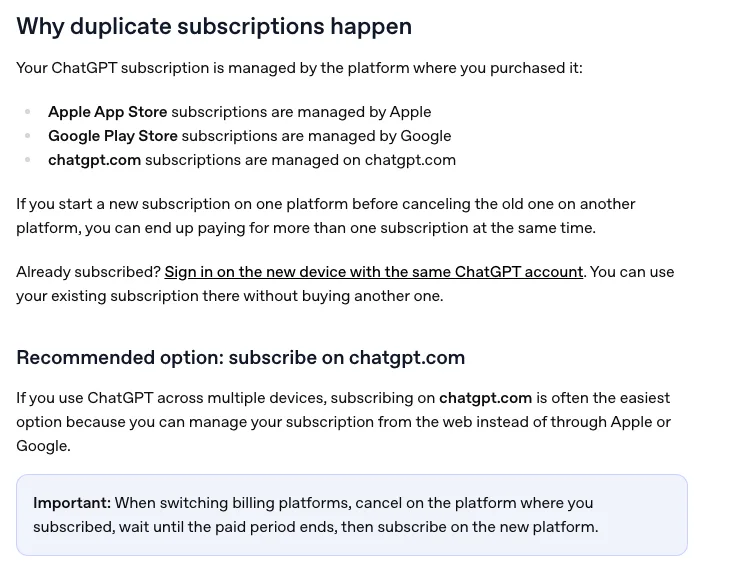
- Switching platforms (say from the App Store to the web): cancel where you subscribed first, wait until the paid period ends, then subscribe on the new platform.
- The iPhone trap: if an App Store renewal fails because of a payment problem, the subscription is not cancelled, and Apple keeps trying to recover it. Subscribe on the web in the meantime, then update your Apple payment method, and Apple may renew the old subscription too. That is two subscriptions.
- Several accounts: each ChatGPT account has its own plan, and switching accounts does not share a subscription. Another account needs its own paid plan, which is a second charge.
- ChatGPT and the API are billed separately: API usage and prepaid credits on platform.openai.com (often OPENAI SAN FRANCISCO on the card) are a different bill and do not count towards your ChatGPT plan.
Where to check and cancel on each platform
- Web (chatgpt.com): sign in on a computer, select your profile icon → Settings → Billing, and see whether there is a plan managed on the web. To cancel, select Cancel under Cancel plan.
- iPhone (App Store): open Settings → tap your name → Subscriptions and look for ChatGPT. Tap Cancel Subscription. No Cancel button, or an expiry date in red, means it is already cancelled.
- Android (Google Play): open the Play Store, make sure you are signed in with the Google account you subscribed with, then profile picture → Payments & subscriptions → Subscriptions → ChatGPT → Cancel subscription.
- Have more than one ChatGPT account? Check each one as in step 1. Uninstalling the app does not cancel an App Store or Google Play subscription.
- Decide which one to keep and cancel only the extra one. For the one you keep, have the plan price, any tax and $1 on the card before the renewal date.
Can you get a refund for the second charge?
The Help Center separates two cases. A verified duplicate billing error (the same subscription charged twice) can be reviewed for a correction. Two subscriptions you bought separately, on two platforms or two accounts, do not automatically qualify for a refund; refunds are assessed separately, and cancelling is not a refund. Where to ask depends on where you bought:
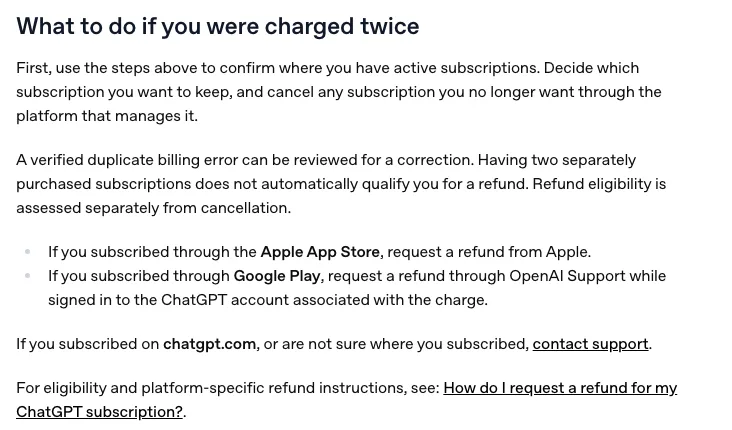
- App Store: request the refund from Apple.
- Google Play: request it through OpenAI Support while signed in to the ChatGPT account that was charged.
- chatgpt.com, or not sure where you subscribed: contact OpenAI Support (the chat icon at the bottom right of help.openai.com).
- Refunds go back to the card that was charged. On a Pink Card, the money returns to the card balance and shows in the card’s transaction history.
What our cards show: 29 cards charged twice or more within 7 days
Scope: successful charges with CHATGPT in the merchant name (web plan OPENAI *CHATGPT SUBSCR, credits OPENAI* CHATGPT CREDIT, Google Play GOOGLE *ChatGPT), 2026-08-24 00:00 to 2026-11-22 00:00 UTC, de-duplicated by transaction ID, excluding reseller and internal test cards. That is 360 charges on 198 cards, $19,763.69 in total: 287 web plan charges (174 cards), 55 credit purchases (31 cards) and 18 Google Play charges (14 cards). Two consecutive successful charges less than 7 days apart on the same card happened 58 times on 29 cards:
| Type | Pairs / cards | Example from our cards (UTC) |
|---|---|---|
| Plan plus credits | 18 / 12 | Sep 18: $40 of credits at 14:29, then a $20 plan charge an hour later |
| Credits again and again | 17 / 9 | One card bought $10 of credits on Oct 19, 21, 23 and 26, then $20 on Oct 29 |
| Upgrade charge | 9 / 9 | Nov 16: Plus at $21.78, then $87.30 six and a half hours later (Plus to Pro 100) |
| A second full-month charge the same day | 7 / 3 | One card was charged $200 at 02:58, 03:23 and 05:48 on Nov 3; another MYR 99.90 twice, 4.5 hours apart, on Nov 12 |
| Another full-month charge 1–7 days later | 6 / 5 | One card is charged $100 on the 15th and again on the 21st, in both October and November; another paid $21.49 on Nov 10 and £17.74 on Nov 12 |
| Google Play plus the web | 1 / 1 | Oct 8 GOOGLE *ChatGPT $200, then $100 on chatgpt.com on Oct 15 |
- The two largest groups involve credits (plan plus credits, repeated credits). They carry a different merchant name from the plan and are not duplicates.
- The 3 cards with identical full-month charges on the same day ($200, $200 and MYR 99.90): a single ChatGPT account is normally billed once per period, so this looks like one card paying for several accounts. If you did not mean to, check each account.
- Two charges in different currencies (for example $21.49, then £17.74 two days later) usually come from two different accounts, each billed in its own currency.
- Google Play plus the web is rare on our cards, but it is exactly the case OpenAI wrote a whole Help Center article about. If you ever subscribed on an Android phone, check Google Play subscriptions too.
How to avoid being charged twice next time
- Subscribe in one place only. If you use ChatGPT on a computer and a phone, OpenAI also recommends subscribing on chatgpt.com and just signing in on other devices.
- One card paying for several accounts: note each account’s billing date and keep enough on the card for all of them together.
- Before upgrading, check how much is charged that day, and keep that amount plus $1 on the card.
- Retiring a card? Change the card or cancel in ChatGPT first, then stop using it. If you only stop topping it up, OpenAI keeps retrying the renewal, and each declined attempt also costs $1.
Keeping the subscription? Top up the same card
- Open pinkcard.cc/en, click “Balance & Top Up” at the top, and enter the 16-digit card number and the 3-digit lookup code (the card’s CVV).
- Choose an amount (minimum $30) and pay with USDT on ERC-20 or BEP-20, USDC on ERC-20, or Alipay (Alipay payments in CNY add a 3% channel fee).
- Top-up cost: $5 plus 5% of (top-up amount + $5). $30 → $36.75, $110 → $120.75.
- Usually on the card within 5–10 minutes. The card number does not change, so ChatGPT keeps billing the saved card. Adding a different card in ChatGPT? Enter the cardholder name exactly as in the card email, and a billing address in the same place your internet connection exits, down to the city.
Already have a Pink Card? Enter the card number and lookup code to see transactions and top up
New card (disclosure: this is our product)
Pink Card is the overseas gift card built for AI subscriptions: a prepaid USD virtual card (Mastercard / Visa) for ChatGPT, Claude, Gemini and similar services. It is only a way to pay; it does not change OpenAI’s rules, and it has no official relationship with OpenAI.
- Choose an amount on pinkcard.cc/en: presets start at $50 ($50, $110, $220, $500, $1000), or enter a custom amount from $50.
- Pay with USDT on BEP-20 or ERC-20, or USDC on ERC-20. The card number, expiry and CVV arrive by email about 1–2 minutes after the payment confirms.
- Card issuance: $10 one-time, plus a 3% service fee on (card amount + $10). A $50 card costs $61.80, a $110 card $123.60.
- From the card balance: $1 per transaction (declined ones too, at most 3 declined charges per card per month) and $2.50 per month. Full fee table: pinkcard.cc/en/fees.
- Once the card details are emailed, the order cannot be cancelled, so double-check your email address before paying.
Buy a card: choose an amount on the Pink Card home page
Adding the card to ChatGPT, step by step with screenshots: How to use Pink Card with ChatGPT
How the upgrade-day charge is calculated: Upgrading ChatGPT Plus to Pro mid-cycle
What OPENAI* CHATGPT CREDIT is and how credits are paid: ChatGPT and Codex credits payment
Subscribed through Google Play on Android: ChatGPT Plus on Google Play: payment declined
What each AI subscription is called on a card statement: AI subscription charge names on a card statement
Two Claude charges in one month: Charged twice by Claude? The usual reasons
Chinese version (中文版,付款方式按中文站): ChatGPT 扣了两次钱怎么回事